




The July release marks a major expansion of the SnapLogic platform for the era of AI-native development. With the general availability of SnapCode and the SnapLogic MCP Server, developers can now build, deploy, and govern production-ready integrations directly from AI coding environments while maintaining the enterprise governance, security, and operational controls organizations already rely on.
Beyond these major launches, this release also includes updates across AgentCreator, API Management 3.0, Monitor, Admin Manager, Public APIs, Snap Packs, and platform management enhancements. Let’s take a look.
SnapCode: build SnapLogic pipelines from your terminal or IDE
NEW: SnapCode is the integration agent for AI coding environments. It is a self-contained, pre-configured development environment that lets you generate, validate, and deploy SnapLogic pipelines using AI coding tools like Claude Code, directly from your terminal or IDE. There is no dependency management to configure.
Describe the integration you need in natural language, and SnapCode returns production-ready SnapLogic pipelines that you own and manage through your existing development workflow. Developers can stay inside their preferred AI coding environment while working against the same enterprise connectivity, governance, and operational reliability organizations already rely on across the SnapLogic platform.
SnapCode comes preconfigured with the capabilities developers need to generate, validate, deploy, and manage integrations directly from their coding environment. These include AI-powered pipeline generation, deployment automation, the SnapLogic MCP Server for secure platform operations, and automated setup across macOS, Linux, and Windows.
You can set up SnapCode in 3 ways:
- VS Code Dev Container
- Docker CLI option
- Local no-Docker mode with a setup script
Authentication defaults to an Anthropic subscription, with AWS Bedrock available as an opt-in flag, so there is no mandatory AWS credential requirement to get started.
What this means for your team
- Developers can go from cloning to generating their first pipeline in under 30 minutes, with no environment troubleshooting or dependency conflicts.
- You can build, refactor, validate, import, export, and run pipelines from the terminal without switching to the Designer UI.
- SnapCode supports macOS, Linux, and Windows, so it works across diverse engineering teams.
- New users and migration engineers can generate pipelines with AI guidance without deep SnapLogic platform expertise, making legacy modernization faster and easier.
Availability: SnapCode and the SnapLogic MCP Server are generally available as of July 7, 2026. At launch, SnapCode supports Claude Code, including the Claude Code extension for Visual Studio Code, with support for additional AI coding environments planned over time.
For access to SnapCode, contact your Customer Success Manager.
SnapLogic MCP Server: governed access for AI agents
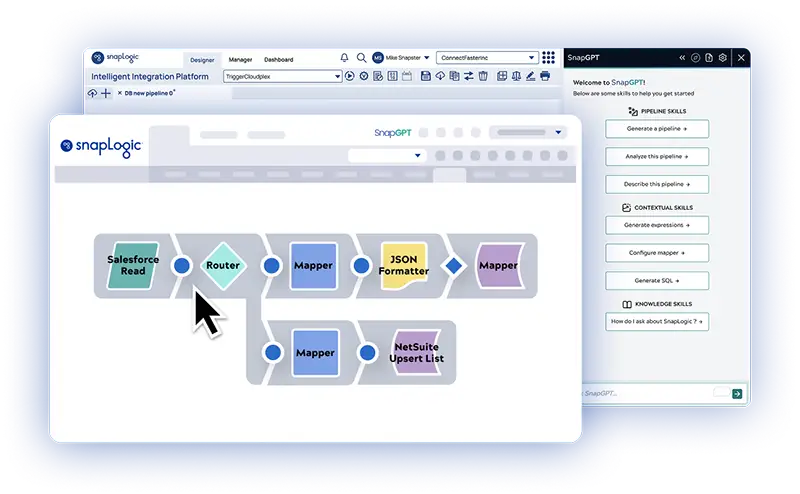
NEW: The SnapLogic MCP Server is SnapLogic’s governed interface for AI agent platform operations. It gives AI agents governed, MCP-compatible access to SnapLogic platform operations, allowing them to invoke platform capabilities programmatically through secure tool calls rather than through the Designer UI.
You can now connect external AI agents, such as SnapCode, SnapGPT, and any MCP-compatible client, directly to the SnapLogic Platform through three purpose-built MCP Server API toolsets:
- Full toolset: for broad platform interaction
- Platform toolset: for pipeline execution and platform management
- PyGen toolset: for AI-assisted pipeline generation
These toolsets front-end the SnapLogic MCP Server over a standard HTTP interface with real-time streaming. That means you can make your existing integration capabilities natively accessible to any agent without custom middleware, API wrappers, or additional development effort. An agent describes what to invoke, and SnapLogic executes it deterministically against the same production runtime, governance model, and operational controls your enterprise integrations already run on today.
That distinction matters at agent scale: AI agents make far more backend calls than a person doing the same task, so every call through the SnapLogic MCP Server is authenticated, audited, and rate-limited, and every execution runs at fixed, predictable cost with no LLM involved at runtime.
This capability is aimed at platform and AI engineering teams who want agents to deploy, run, and manage integrations without a human opening the platform UI, as well as OEM and ISV developers who want to embed SnapLogic’s pipeline catalog into their own products without building the connectivity themselves.
Also in this release: The MCP OAuth2 JWT Validator rule now uses the .well-known/openid-configuration endpoint as the primary source for JWKS URI discovery, with a fallback to .well-known/oauth-authorization-server. This ensures the JWKS endpoint can be retrieved reliably, including for organizations that do not expose an OpenID endpoint.
How this differs from Enterprise MCP: the SnapLogic MCP Server gives agents governed access to SnapLogic platform operations, such as deploying, executing, validating, and managing pipelines.
Enterprise MCP, previously released, is the connectivity layer that turns your existing integrations, APIs, and business processes into MCP-compatible tools that agents can discover and invoke, with Trusted Agent Identity and AI Gateway for governance at scale.
The two capabilities are complementary: the SnapLogic MCP Server governs what agents can do on the SnapLogic platform, while Enterprise MCP governs what agents can reach in the rest of the enterprise.
Highlights across the SnapLogic platform
AgentCreator
In AgentCreator, a new Handle Errors via Agent toggle is now available on all Agent Snaps. It automatically intercepts downstream tool pipeline failures and passes error details back to the LLM for self-correction, so you no longer need to configure error views in your Agent pipelines manually.
Additionally, several LLM Snaps across the Amazon Bedrock, Azure OpenAI, Google Gemini, and OpenAI Snap Packs used within AgentCreator are now labeled “Not Recommended” — either because they were designed for an outdated Agent pipeline pattern or their underlying APIs have been deprecated by the vendor. These Snaps will be removed from the Snap Pack in the August release, so plan any migration off them now.
Admin Manager
The Users table now includes an updated date column showing when each user record was last modified, including changes to profile, permissions, or settings. This makes it easier to identify inactive users for potential deactivation. You can also sort the Users table by Role, Access, Groups, Updated date, and Login, which helps administrators manage large user bases more efficiently.
API Management 3.0
This API Management update adds documentation and examples covering path resolution, the Upstream path, the Documentation tab, and Service categories. Two issues are also fixed: when the Allow access without login setting is disabled in the APIM 3.0 Portal configuration, unauthenticated users navigating directly to a Developer Portal content page are now correctly redirected to the login page. When an APIM user is deleted, their assets are now correctly reassigned to the admin who deleted them.
One known issue remains: in Admin Manager APIM 3.0 Portal configuration, the Build site button sometimes requires two clicks before a build launches. Once the site is rebuilt, a notification shows the percentage complete.
Monitor
The Choose Compare Pipeline dialog has a restyled UI that lets you select a target project and pipeline to compare against the current one. Navigation for parent and child executions has also improved. The pipeline details panel now includes a Children tab that shows a flat list of child pipelines for the current parent, with click-through navigation into nested hierarchies, and a breadcrumb header lets you jump directly to any level of a pipeline hierarchy.
Public APIs
A new Retrieve node capacity data API lets you pull historical node capacity data for your Environment, so you can analyze Snaplex provisioning trends by day or month, across your entire Environment or by individual Snaplex. On the fixed issues side, the Runtime API now correctly returns the object in the References field as an array.
Snaps
The Snaps in this section are available in the latest Snap Pack distribution. To access the latest features, an Environment admin must select that Snap Pack version in Admin Manager.
New
The Snowflake CDC Snap Pack is now available, with two new Snaps:
- Snowflake CDC: captures incremental data changes from Snowflake Streams, retrieving Insert, Update, and Delete changes for a specific table within a specified date and time range.
- Snowflake CDC Account: authenticates with Snowflake to establish the connection used by the Snowflake CDC Snap.
Enhancements
- The Public Key field in the Public Key Account now supports expressions, so you can supply public keys dynamically at runtime, for example, from a secrets manager or a pipeline parameter.
- Data lineage tracking for the JSON Splitter Snap now includes the JSON path used to split columns as a transformation step in the lineage.
- The PipeLoop Snap has a new Minimum Loop Duration property, letting you configure a minimum time per iteration for sub-minute polling and API rate-limit compliance without custom workarounds. Available in 444patches35190.
- The SAP JCo library has been upgraded from 3.1.12 to 3.1.13.
- ServiceNow Snaps now support Knowledge Management tables, letting you create, read, update, and delete knowledge articles, bases, categories, views, and feedback directly. The ServiceNow Query Snap adds Start Page and End Page properties for retrieving a specific range of pages, and its Page Size property now accepts expressions. The Error view for all ServiceNow Snaps now includes the HTTP status code in the reason field to improve troubleshooting, and a new ServiceNow Download Attachment Snap and ServiceNow Dynamic Account support Bearer and Basic token authentication.
Patch updates
| Snap Pack | Date | Version | Update |
|---|---|---|---|
| Snowflake | Jul 10, 2026 | 444patches35372 | Upgraded the bundled JDBC driver to 4.2.0, adding support for Snowflake UUID columns, resolving illegal pattern character errors in date and time formatting, and adding automatic fallback to the supported default JDBC driver class. |
| Oracle CDC | Jul 9, 2026 | main244 | Fixed an issue with the Oracle CDC Snap while reading archive logs from a Data Guard database. |
| Transform | Jul 9, 2026 | 444patches35383 | Added the Omit mapping if missing checkbox to the Mapper Snap to control how missing keys are handled. |
Snaplex version update
To use the July release features and fixes described above, upgrade your Snaplex nodes to the July Snaplex version main-44045 – 4.44.3.0. This version includes the following changes:
- The Cache Service now supports Scheduled Tasks.
- The Pipeline interrupter now properly dismisses Ultra Tasks instead of shutting them down.
- Fixed an issue where some Scheduled Tasks created over six years ago would not start at the scheduled time.
- Fixed an edge case where the requested storage for FeedMaster nodes was unusually high.
Ultra Pipelines enhancement: starting with the August 2026 release, Snaplex Ultra Scheduling will be enabled by default for all environments subscribed to Ultra pipelines.
Since its introduction three years ago, Snaplex Ultra Scheduling has improved pipeline startup times, scalability, and resiliency by managing start and restart actions at the Snaplex level rather than the Control Plane.
To enable Snaplex Ultra Scheduling for your environment before August, or to verify your current status, contact [email protected].
Classic Manager retirement
SnapLogic will retire Classic Manager in the August 2026 release. Project Manager is now the default experience. Environment configuration is available in Admin Manager, and Monitor provides the Notification Center. If your team still uses Classic Manager from the waffle menu, transition to the new experience before August.
Bringing it back to the platform
SnapCode and the SnapLogic MCP Server approach the same problem from different entry points:
- SnapCode meets developers inside their coding environment
- SnapLogic MCP Server meets agents that need to operate the platform directly
They don’t compete with the AI coding agents or foundation models you already use. These platform advancements extend what those tools can do for enterprise integration. As AI agents take on more of the integration workload, that shared foundation is what keeps the work production-ready rather than one-off. Reach out to your Customer Success Manager for access to SnapCode or SnapLogic MCP Server.
For more details, check out the full release notes.