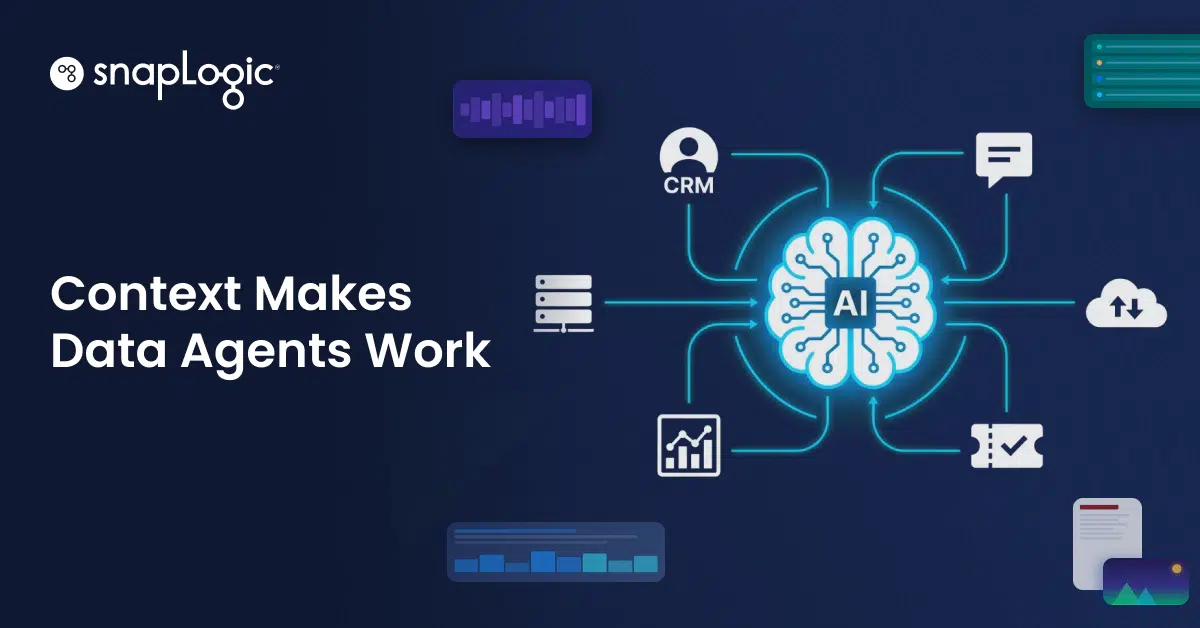



In our last piece on data agent context, we established why context is the foundational problem for enterprise AI agents. Above the model, the compute, and the pipeline sits a more fundamental requirement: context. An agent that doesn’t know what systems it’s connected to, what those systems contain, or how to query them correctly will generate responses that look plausible but don’t reflect reality.
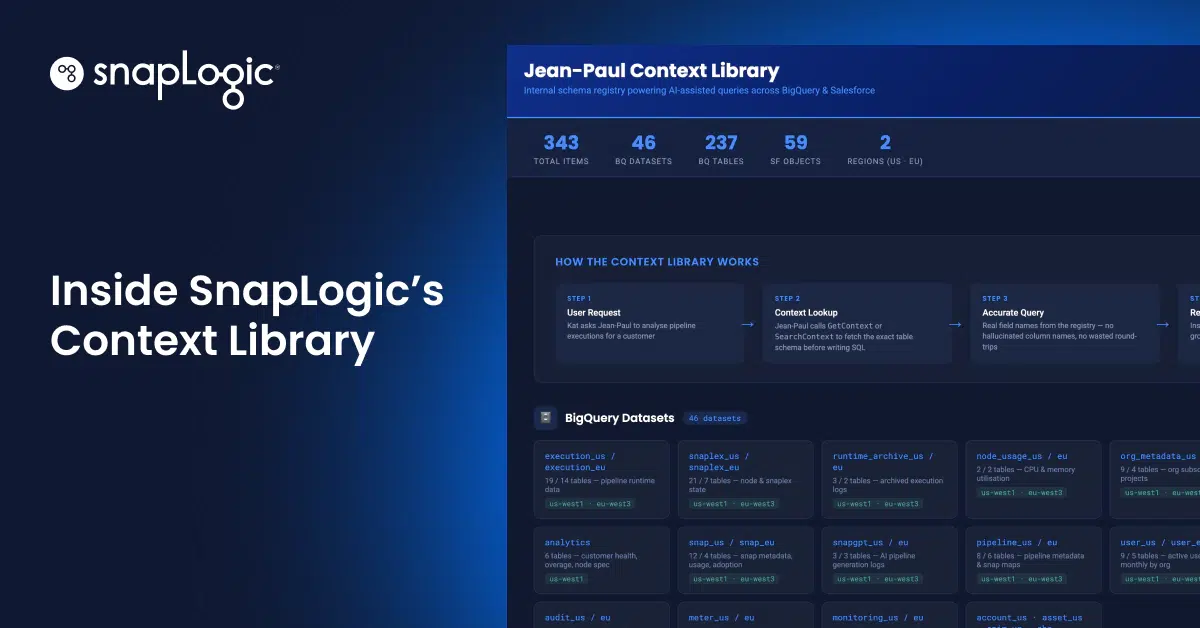
This article is a tour of the Context Library, a core capability of Jean-Paul, SnapLogic’s Enterprise AI Agent, that makes AI agents reliable in production enterprise environments. It covers how context gets discovered, how it’s stored, how it’s enforced, and why enforcement is what makes the difference between a reliable deployment and a well-intentioned demo.
Why enterprise AI agents fail on context
When an AI agent queries Salesforce, it needs to know things specific to your environment: which org it’s talking to, which objects exist, what fields they contain, what field names the API actually expects, and which objects are live versus abandoned relics from an integration project three years ago.
That information has to come from somewhere. It isn’t in the model’s weights, and it isn’t in the connector configuration. Without structured context, agents fall back on inference. For example, they:
- Query “Account.Name” when the actual field is “Account.Customer_Name__c”
- Write SOQL against objects with zero records
- Misread field types, misread nullability, and return results that appear correct until someone validates them.
Context isn’t a nice-to-have. It’s the difference between an agent that queries accurately and one that infers incorrectly.
The Context Library is SnapLogic’s answer to this. It’s a structured, discoverable, self-updating knowledge base that Jean-Paul reads before it acts. It’s also enforced to read before it acts. Here’s how it works.
Tool Discovery: how context gets in
The Context Library lives inside the Jean-Paul admin interface and presents two primary tabs: Tool Discovery and Contexts. Tool Discovery is where the process starts.
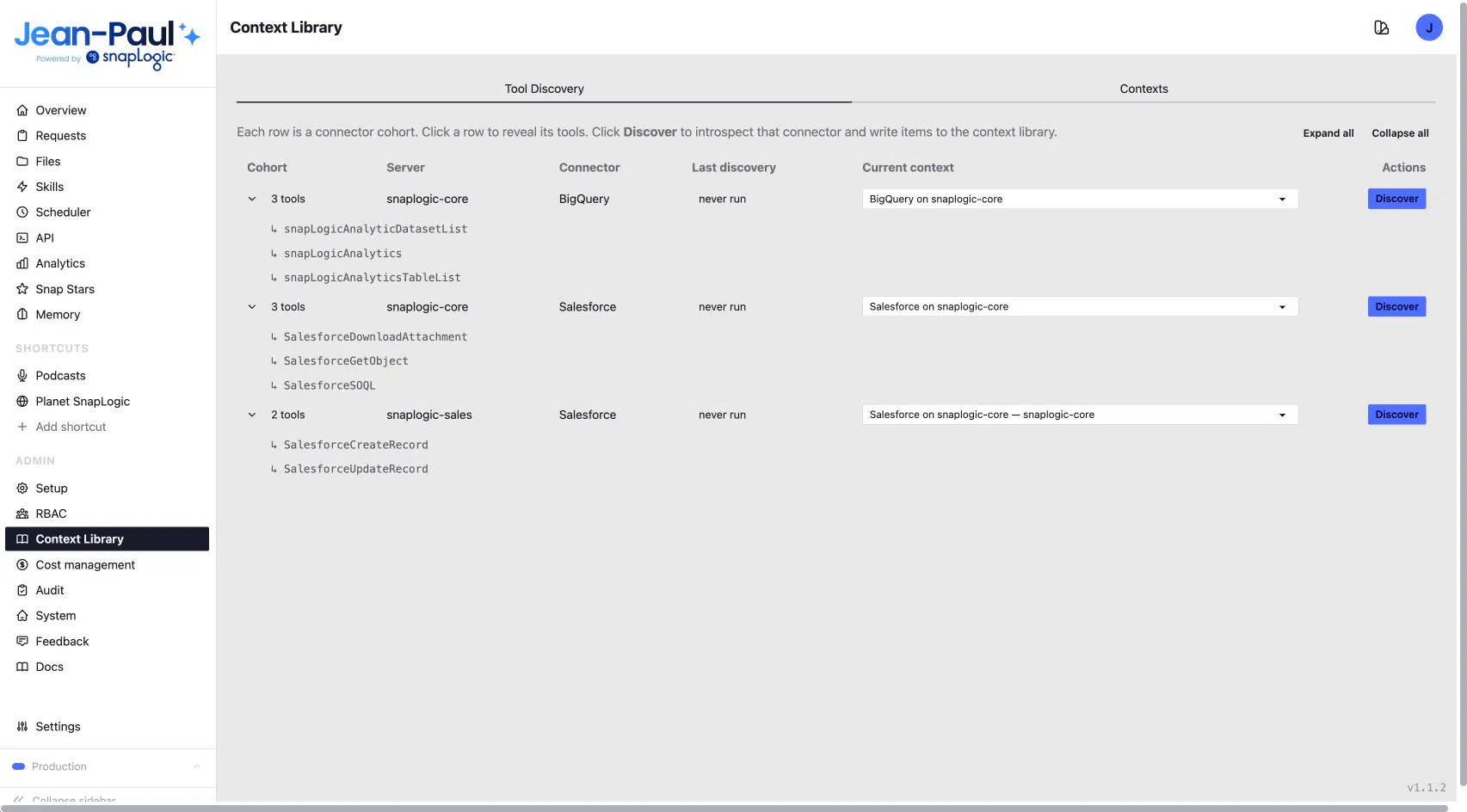
The Tool Discovery tab lists every connector cohort available to Jean-Paul, including:
- BigQuery on SnapLogic Core
- Salesforce on SnapLogic Core
- Salesforce on SnapLogic Sales
Each entry displays the date it was last discovered and features a single “Discover” button.
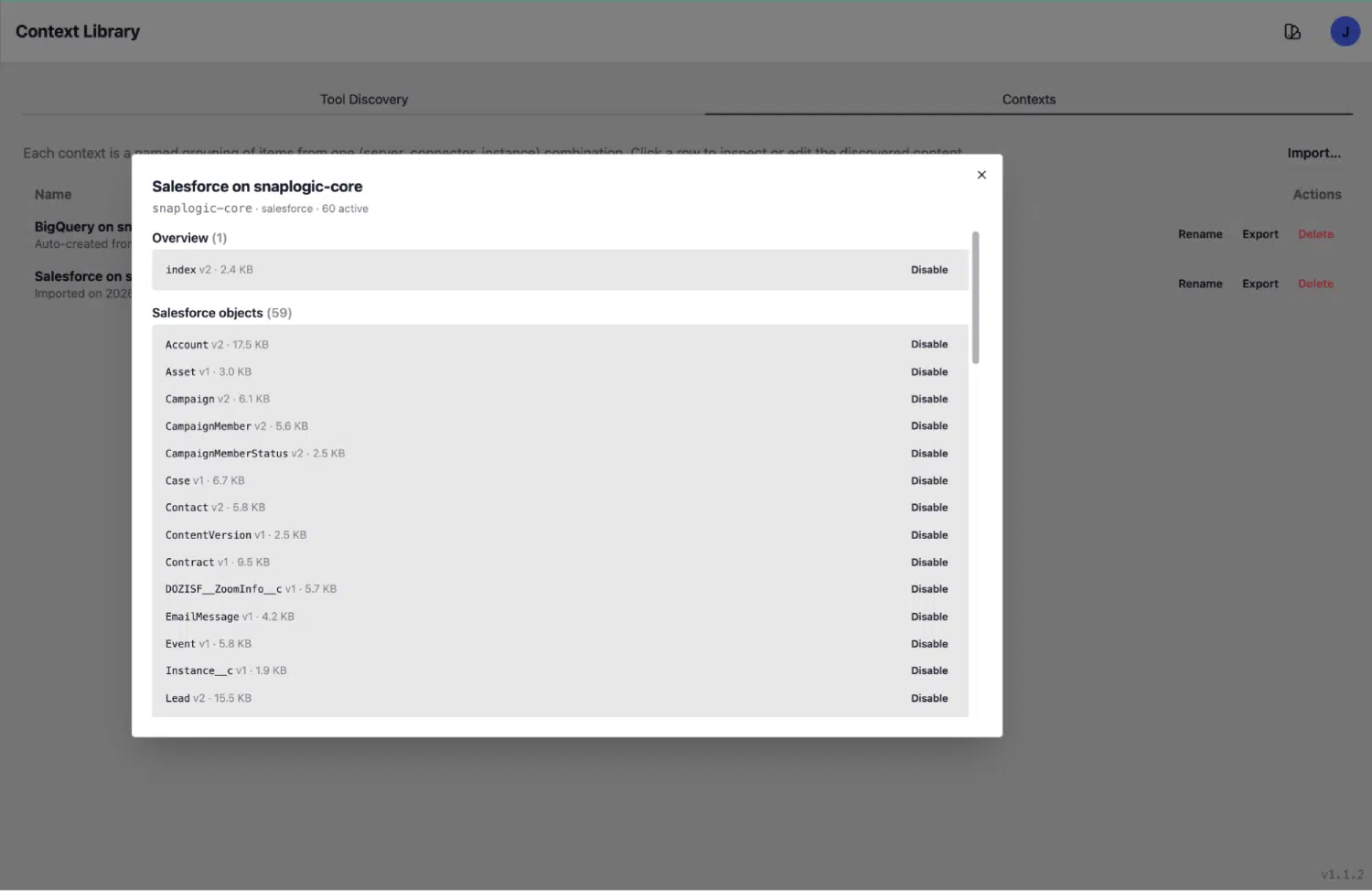
Clicking Discover introspects the live connector directly. Jean-Paul talks to the connected system, enumerates what’s there, and writes the results into the library: object schemas, field descriptions, data types, nullability flags, record counts, last-activity timestamps, and a synthesised purpose summary for each object. The agent sees what is actually there: current, live, accurate.
A single Salesforce discovery run produces 59 objects, each with complete field-level metadata: API names, labels, field counts, and structured notes the agent can read and reason over at query time. Each discovery function is purpose-built for the system it introspects.
The Salesforce discovery identifies objects relevant for agentic usage, filters those with no records, and excludes objects with no customisations or meaningful configuration. That’s how it arrives at 59 curated, signal-rich objects rather than a raw dump of several hundred.
The same principle applies to data platforms (BigQuery, Snowflake, Databricks, Oracle, PostgreSQL), which require catalogue-level introspection because schemas aren’t self-documenting at the field level. Context discovery is required for any system of record (Salesforce, ServiceNow, HCM platforms) or data warehouse that can be customised or extended. Jean-Paul ships with discovery functions for all of them.
The architectural shift that matters: documentation as a side-effect of introspection. It’s produced automatically by the platform and always reflects the current state of the system.
The Contexts tab: rich, structured knowledge
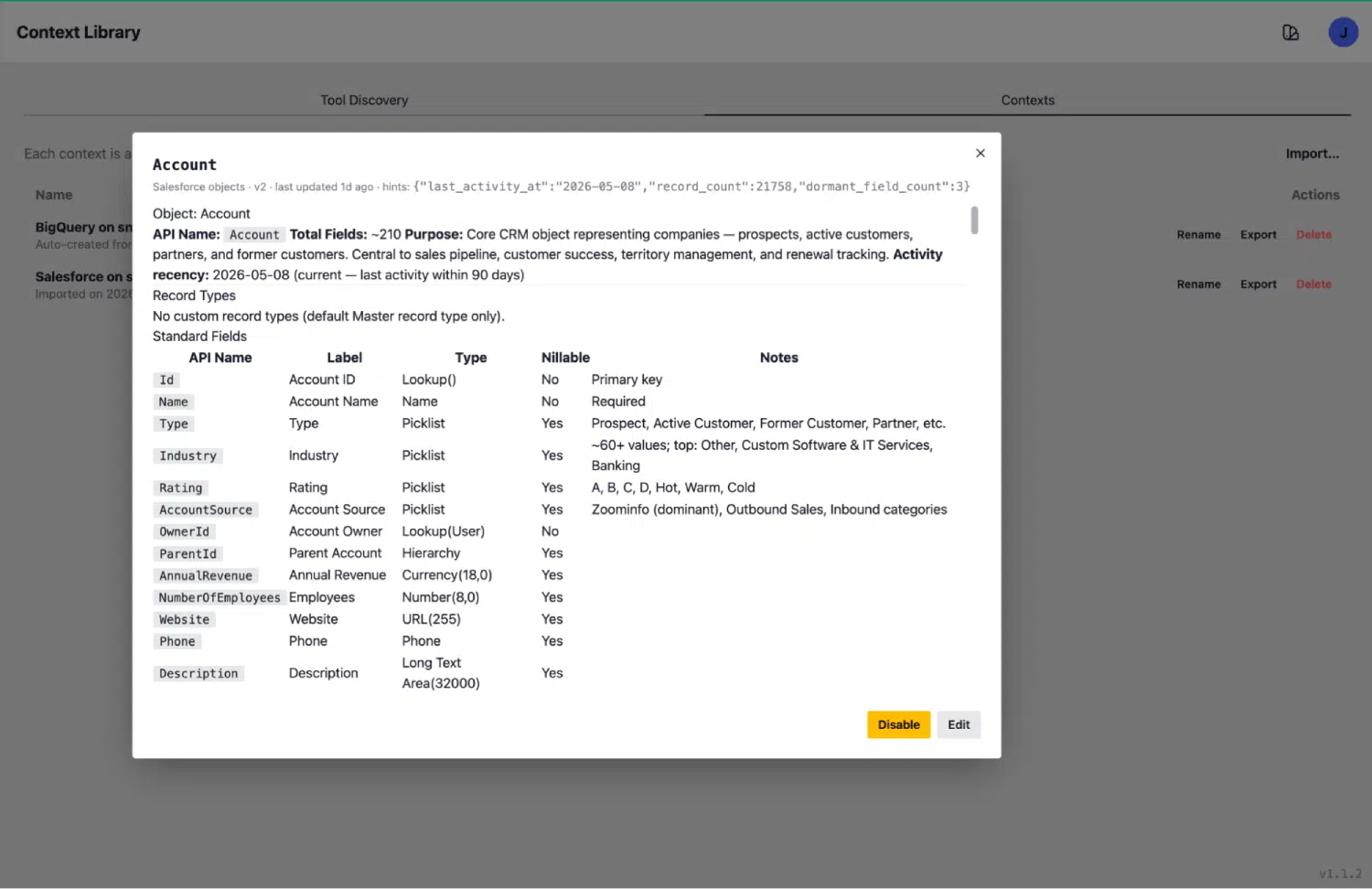
Once discovered, each object becomes a rich context entry in the Contexts tab. This is what the agent reads at inference time: a structured knowledge document with everything needed to query accurately.
Take the Account object as a concrete example. Its context entry includes:
- API name and kind: Account, sf_object
- Purpose summary: “Core CRM object representing companies, prospects, active customers, former customers, partners, etc.”
- Record count: 21,168 records
- Activity recency: last activity 2026-05-22, within 90 days (this object is live and in use)
- Total fields: 210 fields, enumerated with labels, API names, data types, nullable flags, and human-readable notes
- Dormancy signals: surfaced where applicable, so the agent knows which objects are populated versus effectively abandoned
BigQuery context works the same way. The BigQuery connector introspection produces dataset-level and table-level context entries: schema definitions, column descriptions, partition keys, row counts, and data freshness signals. An agent asking “What does the pipeline_events table contain?” gets a structured answer from the library, grounded in current schema knowledge.
Field-level precision determines whether a query succeeds or silently returns incorrect results. In a production environment, that distinction is everything.
Tool Policies: making context use mandatory
Having accurate context is one requirement. Ensuring the agent reads it before every tool call is another. Jean-Paul’s Tool Policies tab is the enforcement layer that connects the two.
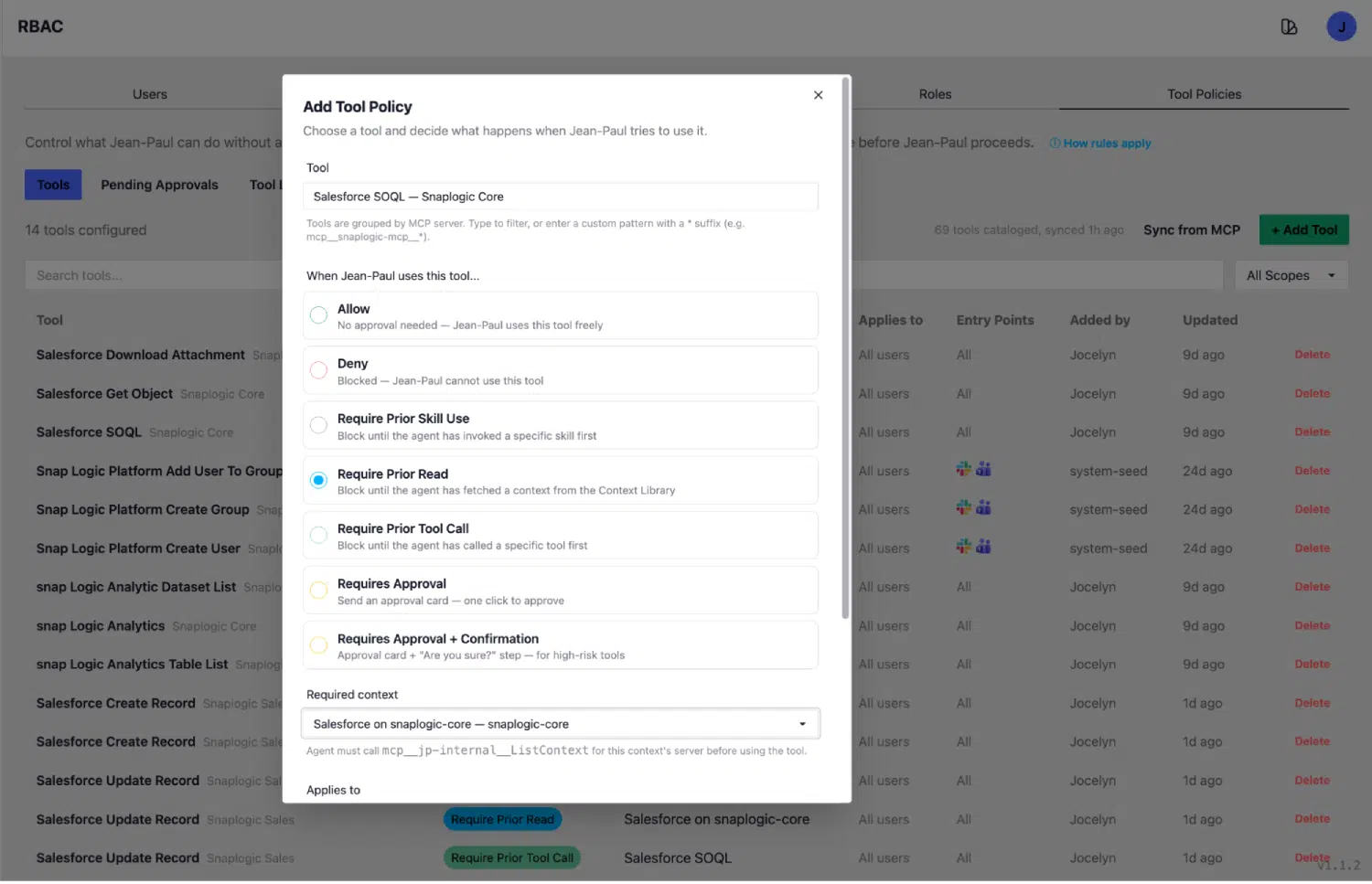
Each tool registered in the SnapLogic platform has a policy. The most important policy types require:
- Approval: A human must confirm before the tool executes. Used for write operations, destructive actions, and anything with real-world consequences.
- Prior Read: The agent must fetch a context entry from the Context Library before this tool can run. Execution is gated on that read. This is the policy that enforces schema-first querying.
- Prior Tool Call: The agent must call a specified prerequisite tool before this tool can run. Execution is gated on that prior call.
The canonical example: SalesforceSOQL has a Require Prior Read policy that enforces a GetContext(sf_object) call first. The agent cannot run a SOQL query without having read the relevant object context from the library. The policy is a gate.
The same pattern applies to BigQuery queries, HR policy searches, meeting transcript lookups, and any tool that requires accurate schema knowledge to function correctly. Sixteen policies are currently configured and applied across all connector scopes.
With tool policies in place, the agent calls GetContext, then SalesforceSOQL, every time, in that order. Schema drift, deprecated objects, multi-org complexity: all of it becomes manageable when the agent is structurally required to consult current knowledge before acting. Build the right enforcement layer, and the prompts take care of themselves.
Keeping the Context Library current
Enterprise schemas evolve continuously. Fields are renamed. Objects are deprecated. New tables are added. Record counts shift. A context library needs to reflect the current state of every connected system, updated automatically as those systems change.
The Context Library addresses this through live re-introspection. Every context entry carries a “last discovery” timestamp. The Discover button re-runs the full introspection against the live connector on demand. Scheduled re-discovery keeps the library current without human intervention.
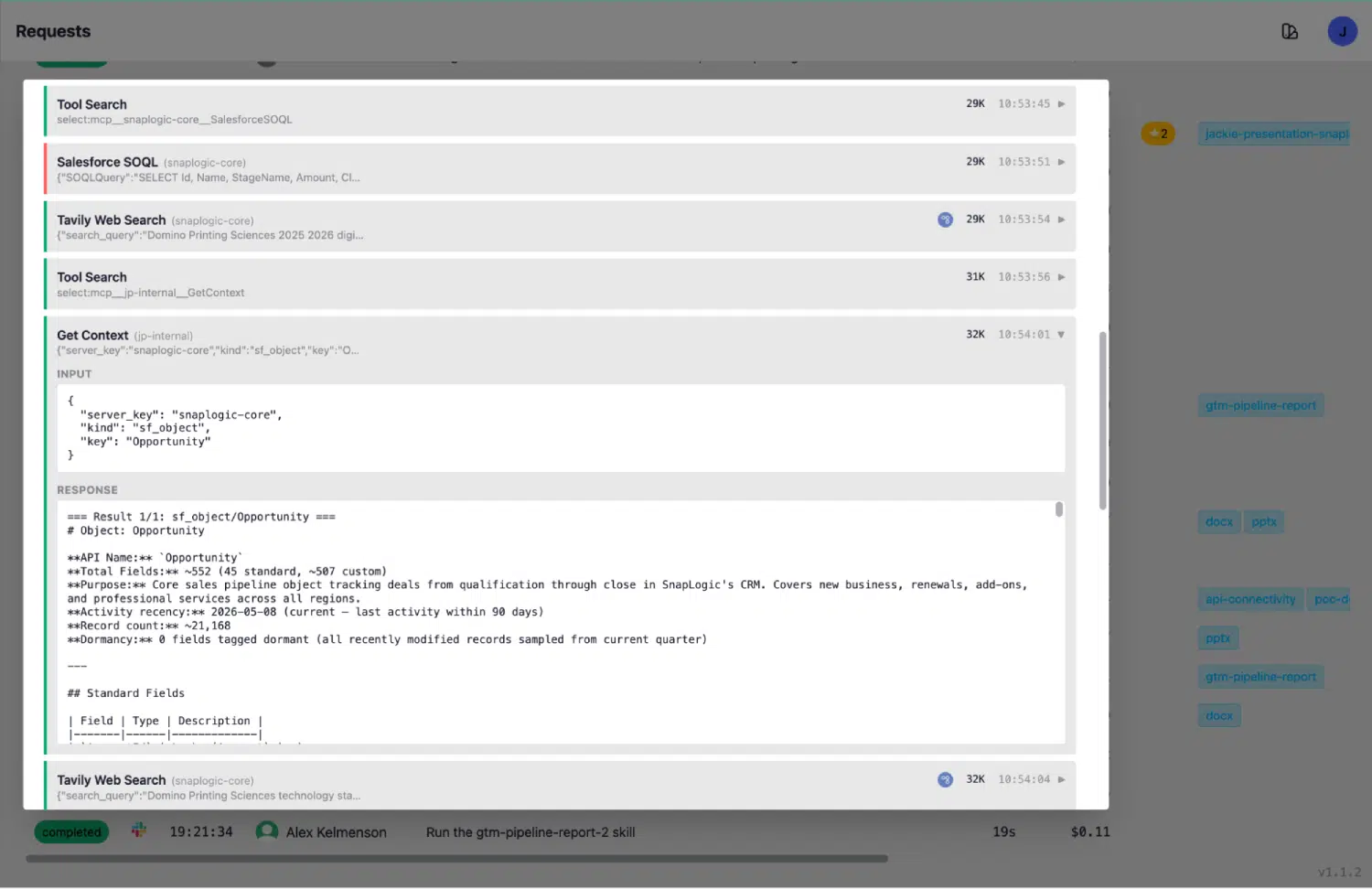
The Requests log is the audit trail of every agent action. When an agent runs a Salesforce query, the log shows the full sequence: ToolSearch to find the right context key, GetContext returning a live response that includes today’s record count and last-activity date, then SalesforceSOQL executing against accurate, current schema knowledge.
The context the agent reads reflects the state of the system now. This is what makes live enterprise deployments on SnapLogic’s platform fundamentally different: the agent’s knowledge of connected systems stays current, automatically, without requiring a human to update documentation every time a Salesforce admin adds a field.
What this looks like for real deployments
Enterprise data environments can be messy. Systems change, connectors multiply, and organizations grow in ways that outpace documentation. The Context Library is designed to handle that messiness without requiring human intervention every time something shifts. Here’s how it plays out across the scenarios data and IT teams deal with most:
- Schema drift: When your Salesforce admin renames or restructures fields, the next discovery run automatically updates the library. The agent queries the new reality, not a stale snapshot.
- Connector proliferation: When Salesforce exists across multiple connector scopes (sales, core, partner), each gets its own discovery context. The agent knows which object lives where, without guessing.
- Multi-org environments: Separate context entries per org include record counts and activity signals, so the agent can distinguish active production systems from legacy ones sitting dormant.
- Auditability: Every context read is logged, giving compliance teams a clear view of exactly what information informed each agent action.
The thread connecting all of these is a simple architectural principle: AI agents perform at the level of the information they’re given. Structure that information correctly, keep it current, and the model has what it needs to be genuinely useful.
The Context Library is live today in Jean-Paul, running in production on SnapLogic’s platform across Salesforce, BigQuery, Zendesk, meeting transcripts, HR policy, and a growing list of connected systems.
Request early access to Jean-Paul
Jean-Paul, SnapLogic’s Enterprise AI Agent, is now accepting select early access customers. If you’re an enterprise ready to move beyond the demo and into a live deployment, we’d like to talk.