



Integration can be complex. Whether you’re configuring advanced authentication for a critical API, trying to restructure a tricky JSON payload, or setting up governance for a production environment, you will inevitably hit a roadblock. Fortunately, you don’t have to navigate these challenges alone.
This post taps directly into the collective expertise of the SnapLogic Community (The Integration Nation), consolidating the most complex, often-discussed questions into one definitive FAQ. We’ve crowdsourced clear, practical solutions from seasoned pipeline builders on everything from API authentication and advanced data looping to platform administration and best practices for automated testing.
Stop spending time searching and start building faster. Here are the clear, practical answers you need to master your integration challenges.
API and web service integration
Q: My pipeline is returning a 401 error when calling a REST API. What’s going on?
A: 401 means your request isn’t authenticated. Double-check your account configuration to make sure your credentials, API key, or OAuth token are correct and haven’t expired. If you’re using an API Key Authenticator, verify the token validation settings. For application integrations specifically (e.g., Workday, Salesforce, ServiceNow, Slack, etc.), confirm that your account has the acceptable permissions scoped at the source system level, not just in SnapLogic.
Q: How do I handle pagination when calling a REST API?
A: The HTTP Client Snap (and REST GET Snap) supports pagination, but the approach depends on the API. Common patterns include offset/limit, cursor-based, and link-header pagination. Configure the Pagination settings in the Snap, and use a Router or Pipeline Execute loop pattern to keep calling until you hit an empty page or a total count condition. Note: if you’ve recently migrated from REST GET to HTTP Client, re-validate your pagination logic; behavior differences between the two Snaps can cause silent failures.
Data transformation and mapping
Q: How do I modify or restructure a JSON response in a pipeline?
A: Use the Mapper Snap. It’s your go-to tool for reshaping JSON. You can remap fields, rename keys, and apply expressions like $.map(field => …) to traverse and transform structures. For more complex parsing or generation, combine the Mapper with the JSON Parser and JSON Generator Snaps to handle nested or dynamic structures cleanly.
Q: How do I concatenate values from a field or combine strings in a pipeline?
A: In the Mapper Snap, use JavaScript string concatenation directly in the expression editor. For example: $firstName + ” ” + $lastName. If you’re working with arrays and need to concat values across multiple records, use $.join(“, “) after a Group By or Aggregate Snap to combine them into a single string.
Platform administration and governance
Q: What are the network requirements for setting up a Groundplex, and what do I need to configure before installation?
A: A Groundplex is SnapLogic’s self-hosted runtime engine for on-premises or private network integrations. It only requires outbound HTTPS (port 443) to SnapLogic’s control plane, so you do not need to open inbound firewall rules. If you are behind a corporate proxy, configure the JCC_OPTS environment variable with your proxy settings before starting the service. Nodes in the same Snaplex must be able to reach each other. For production, run at least 2 nodes for high availability, with 4 cores and 16GB RAM as a common starting baseline.
Q: How do I lock down a production org so users can only monitor, not edit?
A: Go to Manager > Permissions and configure role-based access for your production organization. Assign users the Monitor role, which grants read-only visibility into pipeline runs, logs, and assets without allowing edits or executions. It’s good practice to separate Production access from Development/Test organizations and enforce this through your org structure rather than relying on individual permission grants.
Q: Can I use GitHub as a source code repository for my SnapLogic pipelines?
A: Yes. SnapLogic supports Git integration for pipeline version control. You can configure a GitHub repository connection in your project settings, then check in and check out pipeline assets directly. This enables branching, PR-based review workflows, and rollback, which are standard software delivery practices applied to your integration layer. Repository configuration lives at the org level. Check the platform docs for the exact setup steps.
External system integration and data loading
Q: How do I load files from S3 into SLDB on a scheduled basis?
A: Use the S3 File Reader Snap to pull files from your S3 bucket, filter by date using an expression on the file name or metadata, and write to SLDB using the File Writer Snap. Schedule the pipeline via Task in SnapLogic Manager. For “today’s date” file patterns, use Date.now() or new Date().toISOString().slice(0,10) in your filter expression to dynamically match filenames.
Troubleshooting, best practices, and advanced techniques
Q: What is SnapGPT, and how do I use it to build pipelines faster?
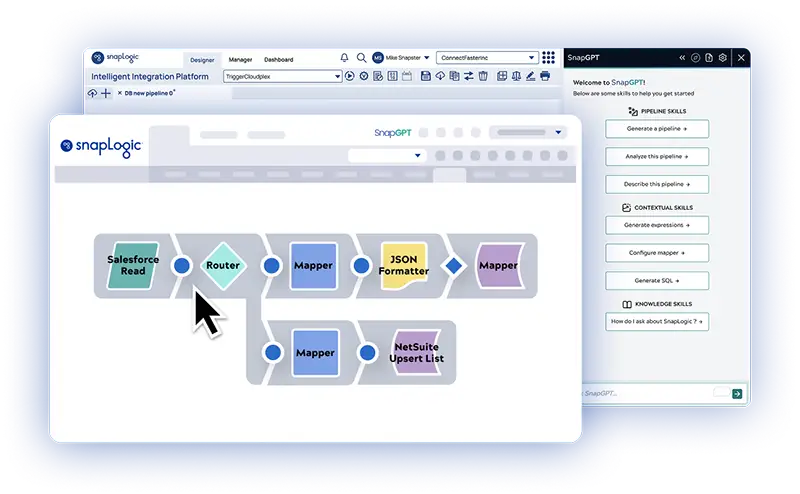
A: SnapGPT is SnapLogic’s built-in generative AI copilot. Describe what you want to do in plain language (“pull records from Salesforce filtered by date and write to Snowflake”), and SnapGPT generates a working pipeline draft you can review and deploy. It also helps with data mapping and expression writing. If you’re stuck on a Mapper expression or a complex JSON transformation, simply describe the logic, and it will suggest the syntax.
Tip: The more specific your prompt, the better the output will be. Always validate with the inline data preview before pushing to production.
Q: What are the most common mistakes beginners make in SnapLogic?
A: There are a few patterns that come up often:
- Not using Accounts. Hardcoding credentials in Snaps instead of reusable Account objects.
- Skipping error handling. Pipelines that fail silently because no error view is wired up.
- Over-engineering too many child pipelines before the logic is proven.
- Ignoring the inline data preview. It’s your best debugging tool, recommended for use with every Snap.
- Not setting the Pipeline Execute Pool size appropriately for concurrent workloads
Q: How do I implement looping in SnapLogic? For example, iterating through a list of REST API calls?
A: SnapLogic doesn’t have a native for-loop construct, but you can achieve looping through two approaches:
- A Pipeline Execute Snap in a loop pattern. Pass a list of items and use a Router/conditional to re-invoke until a condition is met.
- Use the REST Snap with built-in pagination for API-level iteration. For more complex stateful loops, a recursive child pipeline pattern works well.
Q: How do I set up automated testing for SnapLogic pipelines?
A: The community has had success with Robot Framework for SnapLogic test automation. The approach involves triggering pipelines via the SnapLogic Public API, asserting on outputs or Snaplex logs, and integrating the test suite into a CI/CD pipeline. You’ll need to set up JWT authentication for the Public API calls (you can configure this in your SnapLogic Account settings). Combine this with the SnapLogic Monitor for runtime observability, and you have a solid end-to-end testing and monitoring setup.
Join the Integration Nation on Slack
This FAQ provides clear, tested answers to some of the most complex challenges in integration, straight from the collective knowledge of SnapLogic users. By crowdsourcing solutions to topics like advanced API authentication, best practices for error handling, and sophisticated pipeline control, the community accelerates your development and ensures you’re leveraging the platform to its fullest potential.
The conversation never stops. If you have a question that’s not covered here, or if you want real-time troubleshooting assistance and to connect directly with other integration experts, join the SnapLogic Slack Community today.